
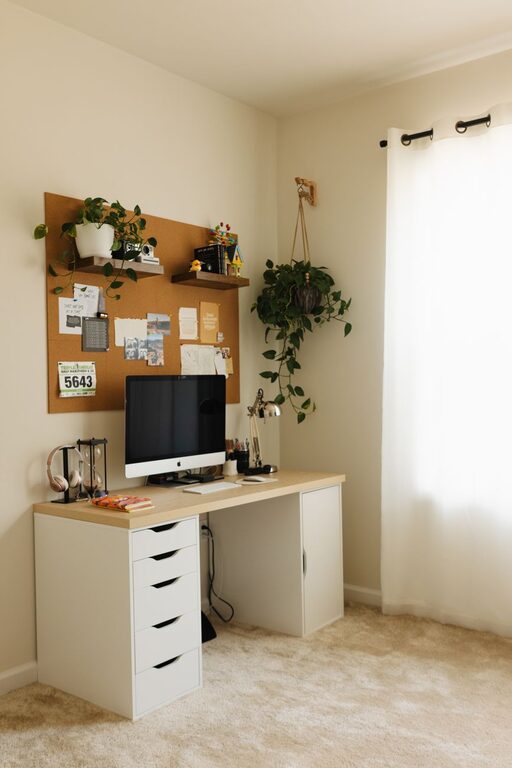
Creating a cozy and inviting home office space is more important than ever. Whether you work remotely full-time or just need a dedicated spot for occasional tasks, having a comfortable and well-designed workspace can improve your focus, reduce stress, and make work feel less like a chore. If you’re looking to set up or refresh your home office, here are some practical tips to help you create a space that feels warm, inspiring, and efficient.
1. Choose the Right Location
Selecting the perfect spot in your home is a great first step in designing your office. Ideally, pick a quiet area with minimal distractions and enough room for your essentials.
– Natural light: Try to position your desk near a window. Natural light boosts mood and productivity, and the view outside can provide occasional visual breaks.
– Privacy: If possible, choose a space that offers some privacy. A corner in your bedroom or a small nook in the living area can work well.
– Electrical outlets: Ensure your chosen spot has enough outlets for your computer, printer, and any other devices.
2. Invest in Comfortable and Functional Furniture
Comfort is key when setting up a home office because you’ll likely spend many hours there.
– Ergonomic chair: Find a chair that supports good posture. Look for adjustable height and lumbar support to reduce strain.
– Desk size: Choose a desk that fits your workspace needs but doesn’t overpower the room. It should have enough surface area for your computer, notebooks, and other tools.
– Additional storage: Consider desks with built-in drawers or add shelves and filing cabinets to keep the area organized.
3. Use Soft, Warm Colors
Colors affect our mood and productivity, so pick hues that create a calming and inviting atmosphere.
– Warm neutrals: Shades like beige, soft gray, or taupe provide a cozy background without being distracting.
– Accent colors: Incorporate warmer accents like mustard yellow, dusty rose, or blended earth tones through pillows, rugs, or wall art.
– Avoid overly bright colors: Too much brightness can be overwhelming. Instead, focus on soothing blends that encourage focus.
4. Add Personal Touches
Personalizing your space makes it feel welcoming and uniquely yours.
– Photos and artwork: Display family pictures, inspiring quotes, or your favorite art pieces.
– Plants: Introducing greenery not only brightens the room but improves air quality and reduces stress.
– Decor: Items like a cozy throw blanket, decorative lamp, or a stylish pen holder can add warmth without cluttering.
5. Organize and Declutter
A clutter-free space promotes clearer thinking and efficiency.
– Use organizers: Drawer dividers, desk trays, and cable organizers keep your supplies tidy.
– File management: Use labeled folders or boxes to store documents. Regularly sort through papers to avoid buildup.
– Digital organization: Keep your computer desktop clean and consider apps to manage your workflow and files.
6. Pay Attention to Lighting
Proper lighting helps reduce eye strain and creates a comfortable environment.
– Layer your lighting: Combine overhead lights with task lamps for flexibility.
– Adjust brightness: A desk lamp with adjustable brightness works great for reading or computer work.
– Consider warm lighting: Warm white bulbs (2700K to 3000K) give a cozy feel, whereas cooler light can be harsh if overused.
7. Incorporate Elements That Boost Focus
Design your space to help you stay productive.
– Noise control: Use rugs, curtains, or even a white noise machine to minimize distracting sounds.
– Comfort breaks: Include a small area to stretch, such as a yoga mat or comfortable chair, to refresh your mind during breaks.
– Inspiration board: A corkboard or whiteboard can hold reminders, goals, or motivational quotes.
8. Maintain Good Air Quality and Temperature
Comfortable air and temperature are essential for long hours of work.
– Ventilation: Open windows when possible or use a fan to circulate air.
– Air purifier: Consider one if your space tends to feel stuffy.
– Temperature control: Use a portable heater or fan to maintain a comfortable temperature year-round.
9. Keep Technology Tidy and Accessible
Technology is the backbone of any home office.
– Cable management: Use clips, sleeves, or boxes to keep cords neat and out of the way.
– Charging stations: Set up a dedicated charging area for phones and other devices.
– Devices placement: Position your monitor at eye level and keyboard at a comfortable height to avoid strain.
10. Regularly Refresh Your Space
A cozy home office doesn’t have to be static. Personal tastes and work needs evolve, so keep your space fresh.
– Rotate décor: Change photos, artwork, or accessories every few months.
– Seasonal touches: Add seasonal plants or candles for a warm vibe.
– Reassess layout: Occasionally rearrange furniture for better flow or comfort.
—
Creating a home office that feels cozy and inviting takes a bit of planning, but the effort is well worth it. By focusing on comfort, organization, lighting, and personal touches, you can build a space where you enjoy spending time and can do your best work. Remember, your home office should reflect your needs and style, making work feel a little more pleasant every day.