
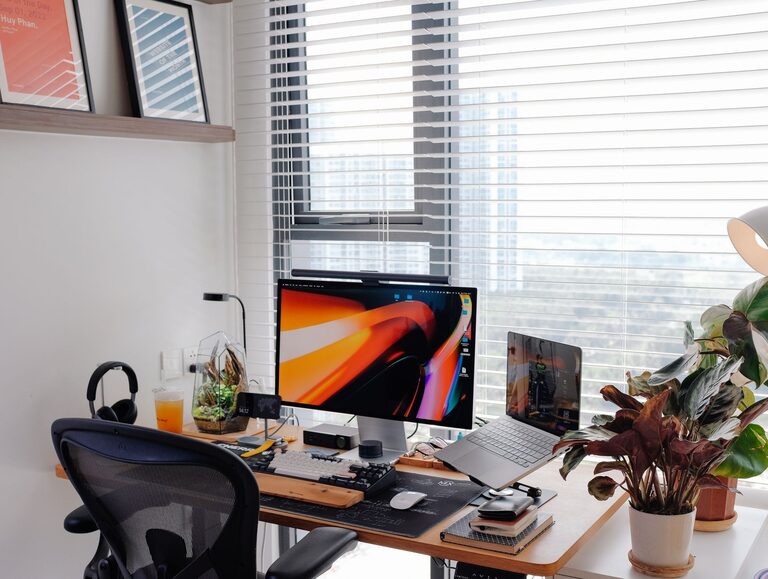
Creating a productive home office environment is essential for anyone working remotely or running a business from home. A well-designed workspace can improve focus, enhance comfort, and help separate work life from home life. If you’re looking to optimize your home office for better productivity, these practical tips will guide you in setting up an efficient and comfortable workspace.
Choose the Right Location
Selecting the right spot in your home for your office is the first step toward productivity. Ideally, choose a quiet area with minimal distractions. If possible, pick a room with a door so you can close off your workspace when it’s time to focus.
Consider natural light
Position your desk near a window to take advantage of natural light. Sunlight helps improve mood and reduces eye strain. If natural light is limited, invest in good quality task lighting.
Avoid high-traffic areas
Avoid spaces near the kitchen, living room, or entryways where foot traffic and noise might interrupt your work.
Invest in Comfortable and Functional Furniture
Your furniture choices impact your posture and comfort, directly affecting your productivity.
Ergonomic chair
Choose a chair that supports your lower back, with adjustable height and armrests to suit your body.
Desk space
Ensure your desk has enough surface area for your computer, notepads, and other tools you use regularly.
Organize with storage
Incorporate shelves, drawers, or filing cabinets to keep supplies and documents organized and within reach.
Keep Your Workspace Organized
Clutter can be distracting and stressful. Maintain an organized workspace by developing habits and systems for keeping everything in order.
Daily tidying
Spend a few minutes at the end of each day clearing your desk.
Use organizers
Items like trays, drawer dividers, and cable management tools help keep everything neat and accessible.
Digital organization
Organize your computer files with folders and clear your desktop regularly to avoid digital clutter.
Minimize Distractions
Distractions reduce focus and slow down progress. Take steps to minimize interruptions in your home office.
Set boundaries
Communicate your work hours to family or roommates and request quiet during those times.
Control noise
Use noise-canceling headphones or ambient background music to block disruptive sounds. White noise machines are another option.
Turn off notifications
Silence non-work-related phone and computer notifications to maintain concentration.
Optimize Lighting and Air Quality
A comfortable environment supports productivity. Proper lighting and good air quality are often overlooked but very important.
Adjustable lighting
Use a combination of natural light, overhead lights, and desk lamps. Avoid harsh glare on your screen.
Fresh air
If possible, open a window occasionally to let in fresh air. Consider a small air purifier if your space feels stuffy.
Temperature control
Keep your workspace at a comfortable temperature to avoid distractions caused by being too hot or cold.
Use Technology to Your Advantage
Technology can help streamline your work and make your home office more efficient.
Reliable internet connection
Ensure you have a strong internet connection to avoid interruptions during calls or online work.
Quality peripherals
Invest in a good keyboard, mouse, and monitor that support your work style and reduce strain.
Productivity tools
Use apps and software for task management, scheduling, and communication to stay organized and connected.
Personalize Your Space
Adding personal touches can make your home office inviting, which can motivate you to work more consistently.
Plants
A few small plants can improve air quality and add life to your workspace.
Artwork and photos
Display images that inspire you or bring positive memories, but avoid cluttering your desk.
Comfortable accessories
Use cushions, footrests, or blankets if they make your space more comfortable.
Establish a Routine
Creating a consistent daily routine helps signal your brain when it’s time to work and when it’s time to take breaks.
Start and end times
Set clear start and end times to your workday to maintain work-life balance.
Breaks
Take short breaks to stand, stretch, or walk around to refresh your mind and body.
Dress for work
Dressing in comfortable but work-appropriate clothes can help you get in the right mindset.
Final Thoughts
Designing a productive home office environment doesn’t require a complete overhaul. Small changes like improving lighting, organizing your desk, or setting clear boundaries can have a big impact. Prioritize comfort and focus, and you’ll create a workspace that supports your best work every day. With the right environment, you’ll find working from home more enjoyable and efficient.